
Pre-consultation in the anaesthesia department
Entrust part of your medical history taking to Aldebaran and get straight to the heart of the consultation.

Better care
76.2%
note an improved ease of practice
Save medical time
30%
of medical time saved per consultation
Better promote your business
+5%
of additional income
Pre-consultation in the anaesthesia department
Entrust part of your medical history taking to Aldebaran and get straight to the heart of the consultation.
Better care
76.2%
note an improved ease of practice
Save medical time
30%
of medical time saved per consultation
Better promote your business
+5%
of additional income
Pre-consultation in the anaesthesia department
Entrust part of your medical history taking to Aldebaran and get straight to the heart of the consultation.
Better care
76.2%
note an improved ease of practice
Save medical time
30%
of medical time saved per consultation
Better promote your business
+5%
of additional income

How does Aldebaran work?
Step 1
Booking an appointment
The patient makes an appointment with their doctor, as usual.
Step 2
Sending the questionnaire
The patient receives an invitation by email and SMS to prepare for their appointment.
Step 3
Preparation
The patient follows a pathway tailored to their profile: they specify their reasons for the visit, update their medical information, upload useful documents and answer any prevention questions.
Step 4
Summary
Aldebaran automatically generates a structured summary, available to the doctor before the patient's arrival.
How does Aldebaran work?
Step 1
Booking an appointment
The patient makes an appointment with their doctor, as usual.
Step 2
Sending the questionnaire
The patient receives an invitation by email and SMS to prepare for their appointment.
Step 3
Preparation
The patient follows a pathway tailored to their profile: they specify their reasons for the visit, update their medical information, upload useful documents and answer any prevention questions.
Step 4
Summary
Aldebaran automatically generates a structured summary, available to the doctor before the patient's arrival.
How does Aldebaran work?
Step 1
Booking an appointment
The patient makes an appointment with their doctor, as usual.
Step 2
Sending the questionnaire
The patient receives an invitation by email and SMS to prepare for their appointment.
Step 3
Preparation
The patient follows a pathway tailored to their profile: they specify their reasons for the visit, update their medical information, upload useful documents and answer any prevention questions.
Step 4
Summary
Aldebaran automatically generates a structured summary, available to the doctor before the patient's arrival.
Information collected before the patient arrives at the practice
Information collected before the patient arrives at the practice


Information collected
Information collected
01
Reason for consultation
02
Personal and family history
03
Allergies and current treatments
04
Anesthetic history
05
Risk factors and points of vigilance
06
Documents, photos, or files
A summary ready before the patient arrives
A summary ready before the patient arrives

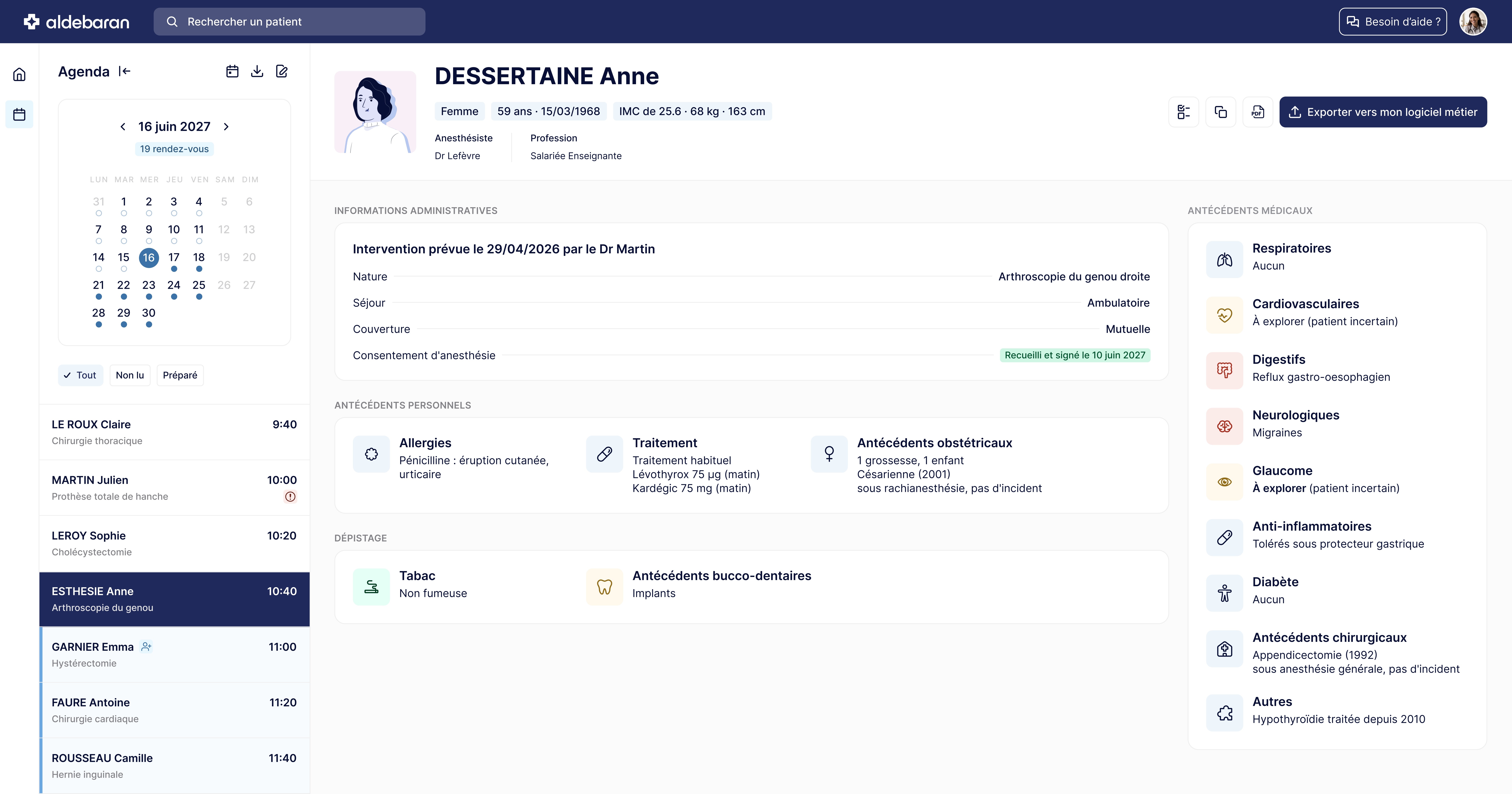
Consultation schedule
Consultation schedule
Quick access to each patient
Medical and personal history
Medical and personal history
Key points to watch at a glance
Electronic signature
Electronic signature
Patient consent in 2 clicks
Start now.
£75
Inc. VAT / month
per practitioner
✓ Installation in less than 10 minutes
✓ Installation in less than 10 minutes
✓ Integrated patient documents
✓ Integrated patient documents
✓ Unlimited patients and preparation
✓ Unlimited patients and preparation
Request a demo
Everything you need to know before starting
Everything you need to know before starting
How do my patients access the questionnaire?
How does Aldebaran integrate with my business software?
Is my patients' data secure?
How long does it take for a patient to complete the questionnaire?
Explore other specialties
Explore other specialties
Explore other specialties